印
AI ProductGitHub
Thai PDF OCR Extractor
AI Engineer

Impact
Robust extraction of Thai text from complex PDFs using multi-engine OCR.
Overview
The Problem: The "Thai Vowel" Nightmare
Extracting text from Thai PDFs is notoriously difficult. Unlike English, Thai has complex script rules—vowels can float above or below consonants, and tone marks stack vertically. Standard PDF extractors (like PyPDF2) often scramble this order, resulting in "gibberish" text. Furthermore, many legacy Thai government documents are scanned images, making simple text scraping impossible.
The Solution: A Modular Multi-Engine Pipeline
We didn't just build a script; we built a selector. Realizing that no single OCR engine is perfect for every scenario, we architected a solution that allows users to choose their "weapon" based on the document type.
Figure: Thai OCR Hero
Technical Deep Dive
1. Engine 1: The Local Workhorse (EasyOCR)
For privacy-centric or offline tasks, we integrated EasyOCR.
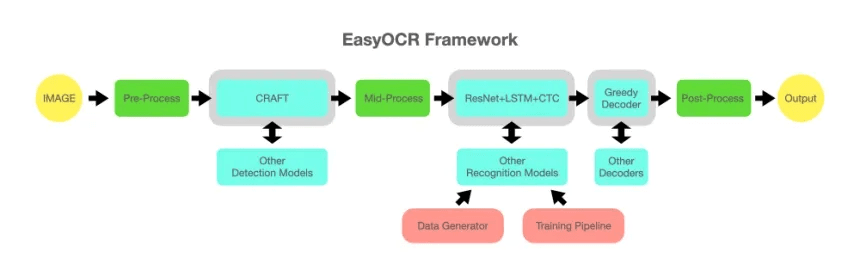
Figure: EasyOCR Framework
- Pros: Runs entirely locally, free, supports 80+ languages.
- Optimization: We implemented a pre-processing pipeline using OpenCV to de-noise and binarize scanned documents before identifying text regions. This significantly boosts accuracy on older, grainy scans.
2. Engine 2: The Cloud Specialist (Typhoon OCR)
For documents requiring high-fidelity structure preservation (like forms or academic papers), we integrated the Typhoon OCR API.

Figure: Typhoon OCR
- Capability: Typhoon is specifically fine-tuned for the Thai language. It excels at recognizing specific Thai fonts (like TH Sarabun New) often used in official documents.
- Integration: Built a robust wrapper to handle API rate limits and batched requests for multi-page documents.
3. PDF-to-Image Pipeline
Since OCR works on images, we built a hybrid conversion bridge:
- Native PDFs: Converted to high-DPI images (300 DPI) using
pdf2imageto ensure crisp character edges for the OCR model. - Stitching: Automated logic to stitch extracted text back into page-ordered text files.
Stack
- Language: Python
- Core: EasyOCR, Typhoon API
- Processing: OpenCV, pdf2image, Poppler
- Format: PDF -> TXT
OCRComputer VisionPythonNLPThai Language
Gallery Overview
Siwarat Laoprom © 2026